
What’s in the latest Chrome update?
First step in cookies lockdown
Chrome 80, which arrived this week, begins the process of locking down cookies and includes patches for 56 vulnerabilities.
Google this week released Chrome 80, beginning a promised process of locking down cookies and at the same time patching 56 vulnerabilities.
The California company paid at least $48,000 in bug bounties to researchers who reported some of the vulnerabilities. Ten were tagged as “High,” the second-most serious in Google’s four-step threat ranking. Half of those 10 were submitted by engineers of Google’s own Project Zero team.
Chrome updates in the background, so most users can simply relaunch the browser to finish the upgrade. To manually update, select “About Google Chrome” from the Help menu under the vertical ellipsis at the upper right; the resulting tab shows that the browser has been updated or displays the download process before presenting a “Relaunch” button. Those who are new to Chrome can download the latest for Windows, macOS and Linux here.
Google updates Chrome every six to eight weeks. It last upgraded the browser on Dec. 10, 2019.
Enforcement of cookie-control starts now
Last year, Google said it would clamp down on cookies – the small bits of code websites rely on to, among other things, identify individual users – using the SameSite standard. SameSite, which has also been pushed by Mozilla and Microsoft, was designed to give web developers a way to control which cookies can be sent by a browser and under what conditions.
With Chrome 80, Google will begin enforcing SameSite, said Barb Smith, a Google executive, in a Feb. 4 post to the Chromium blog. Cookies distributed from a third-party source – in other words, not by the site the user is at – must be correctly set and accessed only over secure connections.
“Enforcement of the new cookie classification system in Chrome 80 will begin later in February with a small population of users, gradually increasing over time,” Smith wrote. Google frequently rolls out new features and other changes in stages, letting it verify that things worked as expected before expanding the pool of users. The company has set the week of Feb. 17 as the opening switch-on-SameSite salvo.
Also, as of Chrome 80, cookies without a SameSite definition will be considered as first-party only by default; third-party cookies – say, those from an external ad distributor tracking users as they wander the web – won’t be sent.
It’s complicated – for users, even IT admins, if not for developers – as this Google video demonstrates. But the result will likely be an aggressive push by Google, using the club of Chrome’s dominance, to motivate site makers and other cookie distributors to get behind the SameSite standard.
SameSite is not Google’s answer to the increasing anti-tracking positions being staked out by rivals such as Mozilla and Microsoft. Google has emphasized SameSite’s security prowess – preventing cross-site request forgery (CSRF) attacks, for instance – not any privacy benefits.
That’s no surprise.
No more notification nagging? That would be great
Chrome 80 also implemented the quieter notifications that Google pledged last month.
Rather than let sites place pop-ups on the page requesting permission to send notifications, Chrome 80 features an alarm bell icon with a strike-through near the right edge of the address bar. The first time Chrome presents the quiet UI, an in-browser dialog, which can be dismissed, will explain the feature.
Users will be able to engage the new notification UI manually using an option in Settings > Advanced > Privacy and security > Site Settings > Notifications. Toggling the “Use quieter messaging (blocks notification prompts from interrupting you)” switch turns on the pop-up blocker. Google has said it would also automatically enable the quieter UI for some. Those who “repeatedly deny” the notification requests will be auto-enrolled. Google will automatically silence some sites as well.
Not all users will see the less-intrusive notification requests immediately; although Google promised that Chrome 80 would launch the feature, Computerworld‘s copies of the browser did not yet show the new UI.
Tab groups supposed to begin to show
Tab groups are also supposed to debut in Chrome 80, but that, too, was not yet enabled by default on Computerworld‘s numerous copies running under Windows 10 and macOS. (The option to turn it on is behind chrome://flags: Search for Tab Groups, change the setting at the right to Enabled, and relaunch the browser.)
Last month, Google said that the feature – which does what it sounds like it does, organizes tabs by lumping together several, each lump designated by color and name – should begin rolling out to users with Chrome 80 but finish that process with March’s Chrome 81.
When it does appear – or after the browser’s owner manually enables it – users can right-click tabs and choose new menu items to create groups, assign tabs to them or remove tabs from those groups.
Enterprise-only
Other additions to Chrome 80 were enterprise-centric as Google continued to enhance the browser’s in-business skills, even more important of late as Microsoft introduced the Chromium-based Edge last month as an alternative.
Enterprise IT admins can enable or disable each type of synchronized data, ranging from History and Themes to Open Tabs and Passwords (just as individuals can do manually in Settings > Manage Sync.), using the newly-documented SyncTypesListDisabled group policy.
More management in Chrome 80 allows for a full blockade on employees trying to install external add-ons. Administrators can call on the BlockExternalExtensions policy to stop the practice. (Note: this does not block kiosk apps or extensions installed by policy.)
Chrome’s next upgrade, to version 81, is scheduled to ship on March 17, 2020.
Focused Inbox and retirement of Clutter
Action Required by: January 31, 2020
Details: In July 2016 we announced that Focused Inbox, a new feature in Outlook that helps you cut through the noise of email to focus on what matters most, would be coming to Office 365 customers. Focused Inbox first rolled out to customers who use modern authentication, and earlier this month we added support for basic authentication. This means that Focused Inbox is now available to all Office 365 customers on the Monthly Channel of Office 365 Pro Plus. If you aren’t seeing it yet, be sure your Outlook version is updated to build 16.0.8730 Version 1711 or greater. Focused Inbox will be available to customers on the Semi-Annual Channel in the March 2018 Semi-Annual Targeted release, and the July 2018 Semi-Annual release, according to that channel’s standard schedule.
With Focused Inbox now rolled out, we’d like to share more about our plans for Clutter. As we mentioned in July, Focused Inbox is the long-term replacement for Clutter. It carries forward Clutter’s capabilities but removes the need to visit a separate folder to check your less-actionable messages. Because Clutter and Focused Inbox use the same algorithms for sorting messages, there are no changes to how email is classified, just a better user experience.
We’ll continue to make Clutter available to Office 365 customers until January 31, 2020. To prepare for Clutter’s eventual retirement, we’ve turned the feature off by default for new users. It’s also deactivated for those with extremely low usage (less than 12 emails per month being moved to the Clutter folder), however they can re-enable Clutter at any time, if desired.
Emotet activity increases by 730% after being in dormant state for nearly four months
The new Emotet trojan detected in September appeared with two other notorious malware dubbed Trickbot and Ryuk.
It also included additional features to steal the contents from victims’ inboxes and credentials for sending outbound emails.
Following a four-month vacation, Emotet’s operators were back in mid-September in several cyber espionage campaigns. In most of the cases, the operators were seen using spear-phishing attack techniques to target organizations.
Although its only been a short time span since Emotet resurged from its dormant state, researchers at Nuspire have found that the malicious activities related to the trojan have increased by 730% in September alone.
Emotet returns with additional features
- The important aspect of the new Emotet trojan detected in September was it appeared with two other notorious malware dubbed Trickbot and Ryuk. These three malware, as a whole, were used to cause the most damage to a network.
- It also included additional features to steal the contents from victims’ inboxes and credentials for sending outbound emails. These stolen credentials were later used to transmit Emotet attack messages.
An overview of Emotet attacks from September
- The first instance of the trojan’s activity was noticed in August 2019 after researchers found command and control servers for the Emotet were being revived by operators.
- In Mid-September, the trojan recorded its first attack campaign that sent emails with financial themes. The campaign was primarily targeted against organizations in Poland and Germany.
- Another new spam campaign that incorporated fake news about NSA whistleblower Edward Snowden’s new book ‘Permanent Record’ as a lure, was reported within a week after the first attack.
- In October, the Emotet botnet was found using a new malicious attachment that is disguised as a Microsoft Office Activation Wizard. The attachment was sent via phishing emails that appear to be fake invoices, order confirmations, payment confirmations, and shipping issues.
- With the start of the holiday season, the operators leveraged fake Halloween invitation emails to spread the malware. The email pushed out new templates that asked recipients to attend a neighborhood party.
Bottom line
Researchers indicate that this significant increase in Emotet activity can pose a serious threat in the future.
“When we saw Emotet decline to a near dormant state in the second quarter, we knew it was only a matter of time until it would resurface with stronger and better tactics. This significant increase in Emotet activity is one of the most dangerous malware botnets affecting the world today, said Matt Corney, Nuspire CTO, Help Net Security reported.
The new Microsoft Project rolls out to customers worldwide
With Microsoft 365, the world’s productivity cloud, we’re using the power of the cloud to help people and organizations achieve more. Last year, we shared our new vision for work management designed specifically to help teams collaborate on projects more efficiently and achieve more together. Today, we’re announcing a major step toward achieving this vision with the general availability of the new Microsoft Project along with a new subscription plan!
Collaborating in teams and projects has become an integral part of our work experience. Businesses increasingly rely on project teams to advance strategic initiatives, drive change, and solve tough problems. But keeping projects on track isn’t easy, especially when teams are working on multiple workstreams to achieve aggressive goals on tight deadlines.
The new Project is designed to be both simple and powerful, so anyone can get started quickly and take control of any project right away.
A fresh new experience
Project offers a redesigned user experience that is simple and intuitive. Teams can quickly add new members and set up tasks, and then easily switch between grids, boards, or timeline (Gantt) charts to track progress. And because Project is part of the Microsoft 365 family, project teams can save time and do more with built-in connections to familiar apps like Microsoft Teams and Office.
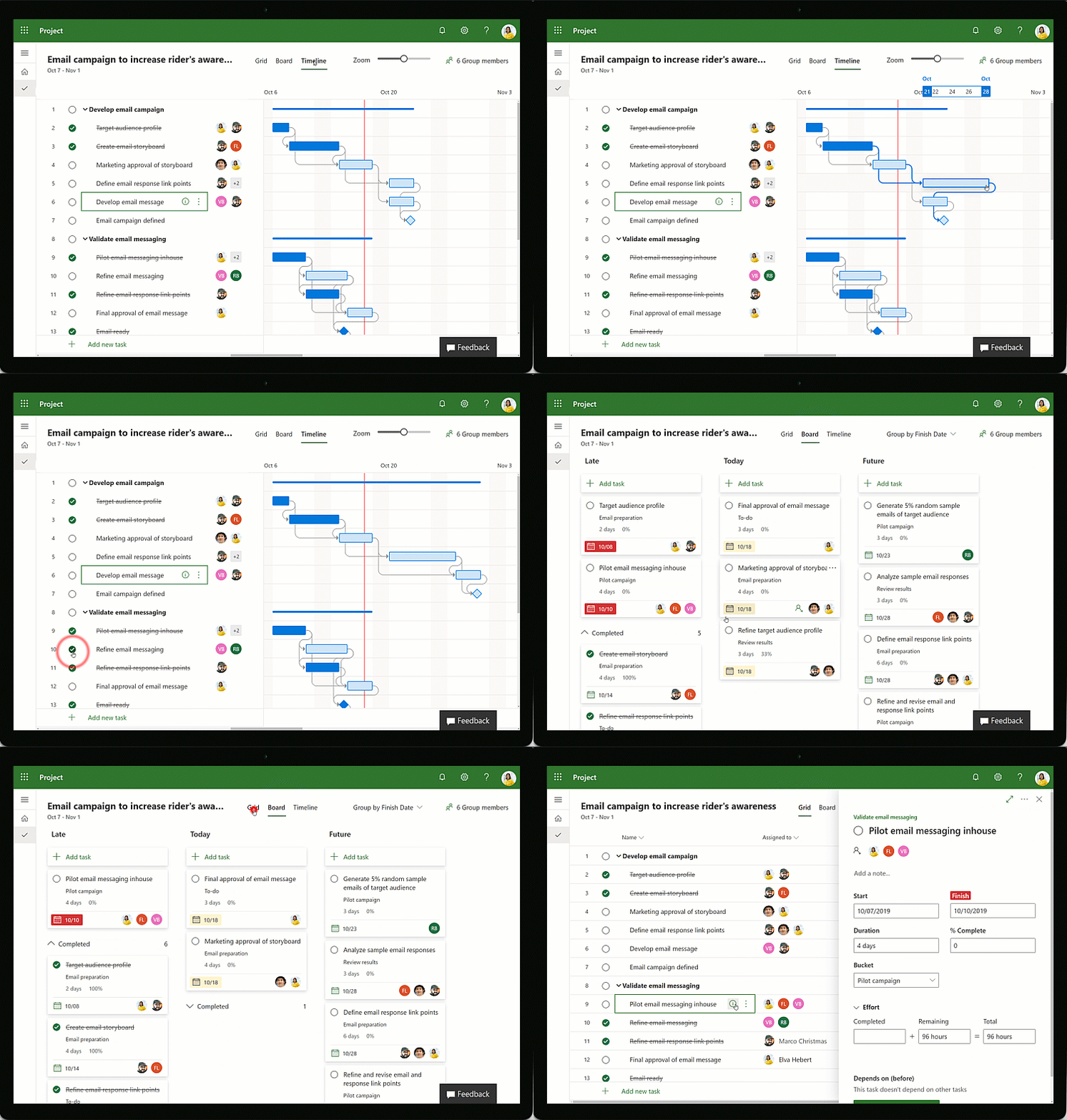
Collaboration made easy
Designed to do much more than just track progress, Project works with Teams to support collaboration and make it easy to manage all aspects of a team project, including file sharing, chats, meetings, and much more. Team members in scattered locations can even edit tasks simultaneously, so they can get more done together, no matter where they are. To help teams stay on track, Project offers an automated scheduling engine based on effort, duration, and resources.
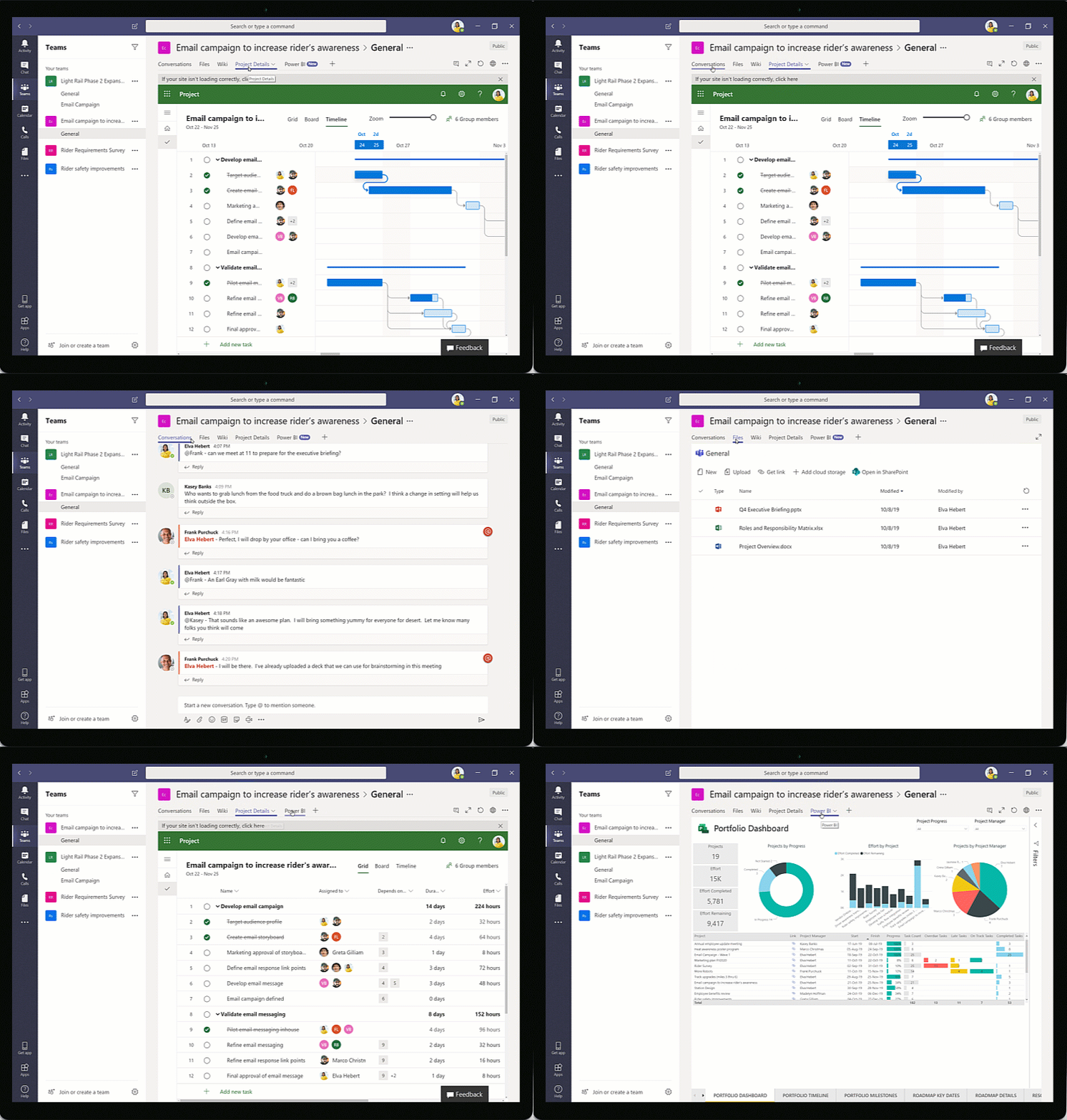
Project with Teams.
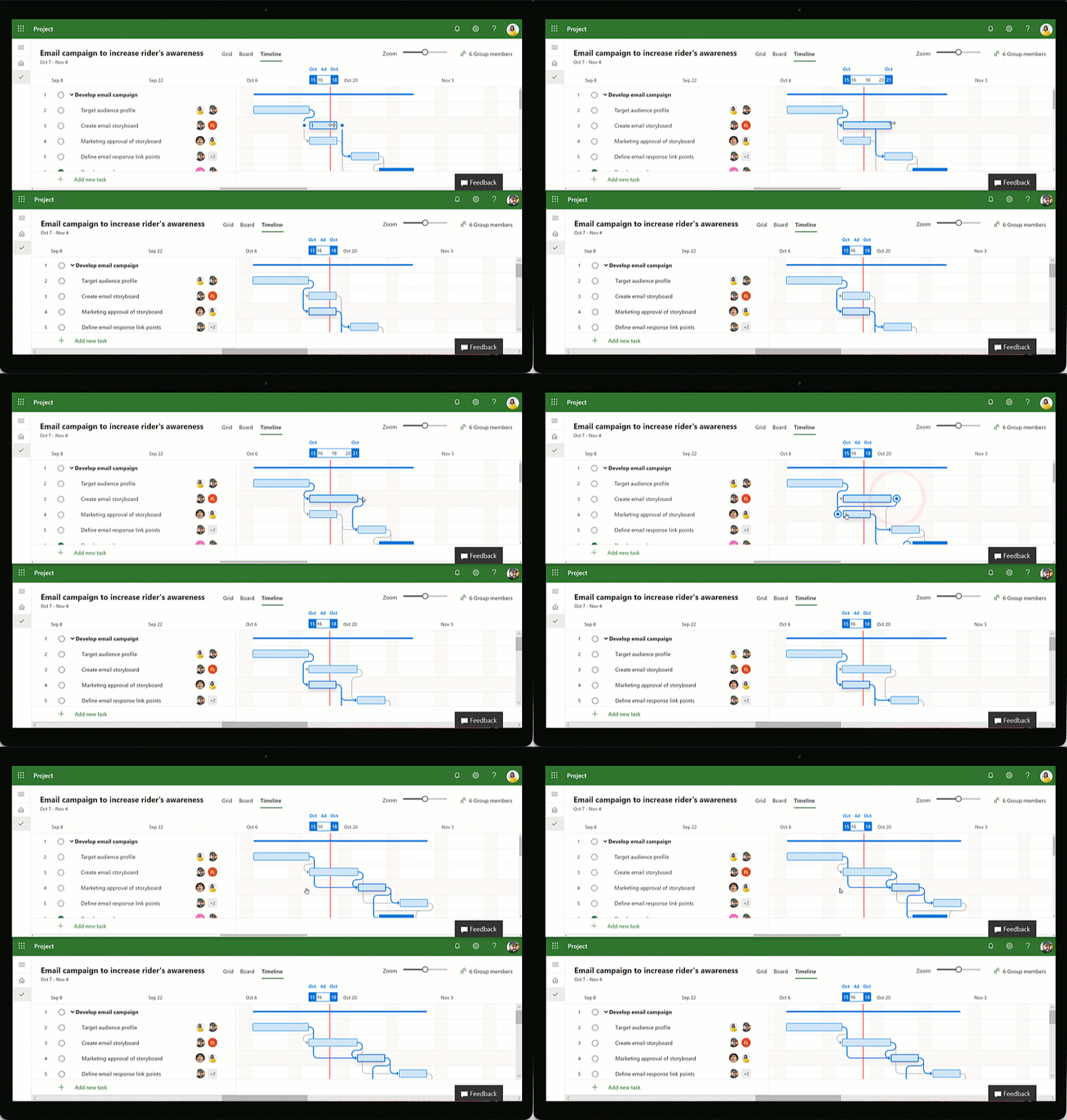
Coauthoring in Project.
Insights at your fingertips
The new Project provides greater visibility into your projects and powerful tools to help you anticipate future needs. Create stunning interactive dashboards in Power BI, so you can visualize every aspect of each project at a glance. Get the big picture view of all your projects across your organization with the visual, interactive Roadmap feature.
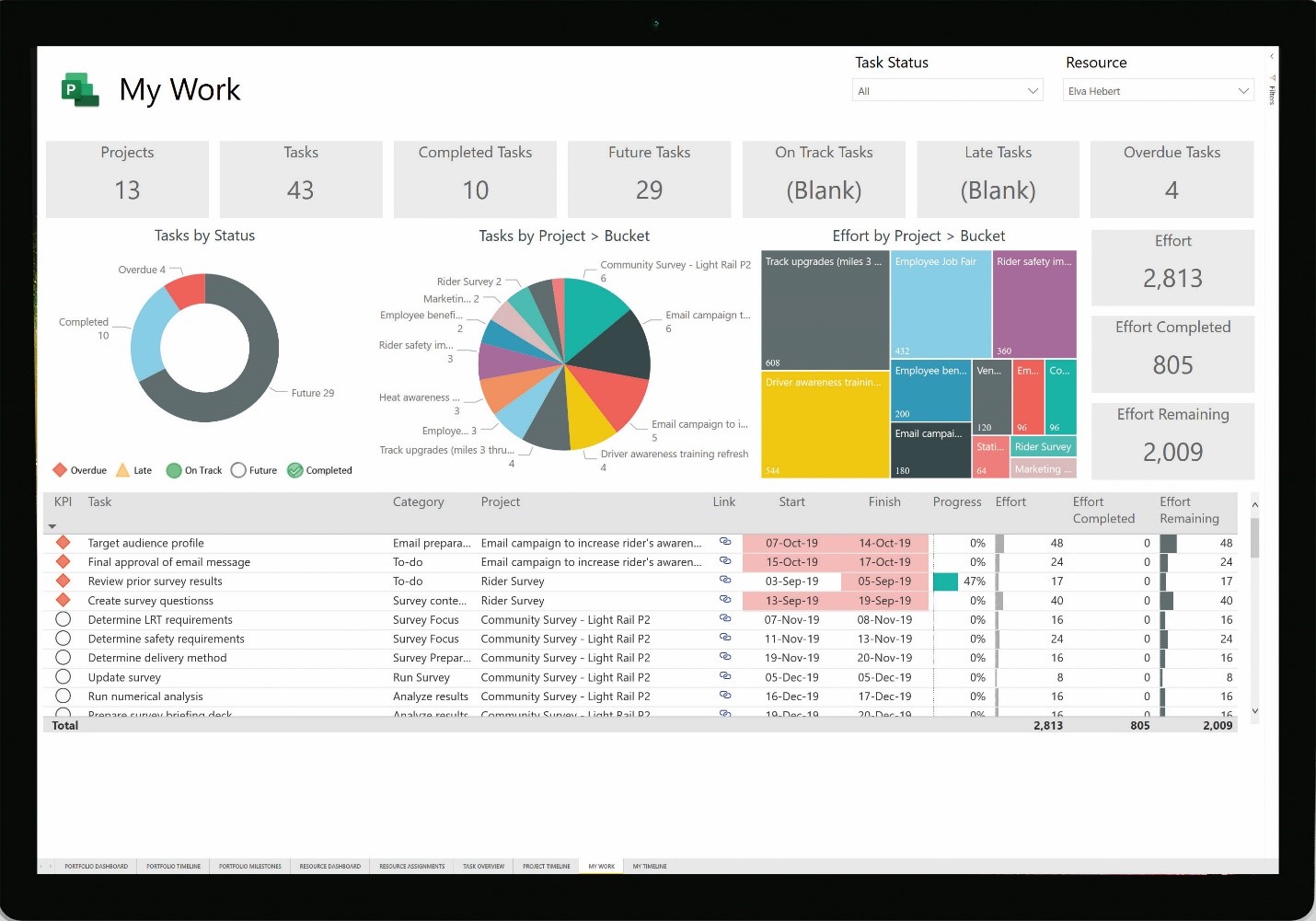
Project data in a Power BI dashboard.
Extensible platform
Built on the Microsoft Power Platform, Project enables you to quickly connect to the apps and services you already use, and to create custom desktop and mobile experiences to meet the specific needs of every project team. Easy to use tools make it simple to create automated workflow processes that streamlines compliance and increases efficiency. Do all this and more with the confidence that comes with knowing you are building on the powerful security and compliance capabilities of Azure—
Introducing a new Microsoft Project plan for all users
As part of this launch, we’re also excited to announce a new subscription plan: Project Plan 1.
Project Plan 1 is for teams that need the essential capabilities of managing task-oriented projects like assigning tasks and dependencies and scheduling and tracking project work using lists, boards, and timelines. At just $10 per user per month, this subscription is an ideal way to get started with Project.
Project Plan 1 joins our current subscription offerings, Project Online Professional and Project Online Premium, now renamed to Project Plan 3 and Project Plan 5 respectively. Customers using Project Online can continue to do so with confidence knowing that we’re committed to your success no matter which Project service you choose.
The rollout of the new Project began in mid-October. If you already have a Project subscription plan, you should receive a notification inviting you to try the new Project experience. If you don’t have a Project subscription yet, we invite you to either learn more or try out Project Plan 1 today!*
What’s next?
Looking forward, we will release more exciting capabilities in the new Project, including resource management, budget analysis, and time and expense tracking. These powerful features will enable you to streamline more complex initiatives and help your business maximize ROI.
As we continue to innovate with the new Project, we rely on customers, like you, to help shape the direction of future releases. You can reach us via the Feedback button in the new Project UserVoice or through your Microsoft representative, to share your feedback and ideas on how Project meets your needs today and into the future.

Microsoft Project
Streamline project, resource, and portfolio management with Microsoft Project to help you keep track of projects successfully.
Frequently asked questions
Q. How does new Project compare to Microsoft Planner?
A. Planner remains the starting point for individuals and teams to collaborate on tasks. Many teams find that they need more power—
Q. Can I continue to use Project desktop app?
A. Absolutely, you can continue to rely on the full power of the Project desktop app.
Q. Does Project Plan 3 and Project Plan 5 include Project Plan 1 capabilities?
A. Yes, both Project Plan 3 and Project Plan 5 will include the Project Plan 1 capabilities.
*Plan 1 is available for purchase starting October 29, 2019 in the U.S. and select international markets. It will be available for purchase starting mid-November in other international markets (except for France and South Korea).
End Of Support For Windows Server 2008
End of support for Windows Server 2008 and Windows Server 2008 R2:
Windows Server 2008 and Windows Server 2008 R2 are approaching the end of their support life cycle (14th Jan 2020). It seems like 2020 is a way’s off but updating an IT infrastructure can be a large task. If you are still running Windows Server 2008 R2 the time to start planning is now.
No patches leaves your operating system vunerable to security issues
End of support refers to the date when Microsoft no longer provides automatic fixes, updates, or online technical assistance. Vulnerabilities in the operating system that are discovered after this date will not be fixed by Microsoft. Furthermore, after that date Microsoft will no longer off any type of support for the operating system. It won’t be long before those systems are specifically targeted and exploited.
Customers who use Windows Server 2008 or Windows Server 2008 R2 products and services should migrate to Microsoft Azure to take advantage of 3 additional years of Critical and Important security updates at no additional charge and modernize when ready. For environments other than Azure, we recommend customers upgrade to the latest version before the deadline. For customers who cannot meet the end-of-support deadline may purchase Extended Security Updates to keep server workloads protected until they upgrade (some restrictions apply).
Business IT Support
With the arrival of GDPR, ever increasing security threats and our growing dependency on IT, it’s essential that you have a Microsoft Certified IT Support provider that takes the responsibility of looking after your business, and your data, seriously.
As one of the leading providers of IT Support in London, Surrey, Kent & Sussex, we pride ourselves on our 25 year track record for delivering excellence. Forging lasting relationships that are built on trust and exceptional service. No jargon, no stress and no time wasting. Just a smooth, efficient service that ensures your business is free of disruption, your data is secure and you’re achieving the maximum return on your IT investment.
If you’re a business or charity based in London, Surrey, Kent, East Sussex or West Sussex and have between 5 and 250 users, and you’re considering switching IT Support provider, we’d love to hear from you.